How Do Facebook Ads Work? The Core Process
Facebook advertising works through a real-time auction system. Every time a user opens Facebook or Instagram, Meta runs an instant auction to decide which ads to show that person based on three factors:
1. Advertiser Bid — how much you are willing to pay for a result (click, impression, conversion) 2. Estimated Action Rate — how likely the user is to respond to your ad based on past behaviour 3. Ad Quality and Relevance — how relevant and engaging your ad is to that specific person
The advertiser with the highest combined score wins the placement. This means having a great, relevant ad can beat a competitor spending more money.
Facebook Ads Campaign Structure (3 Levels)
Understanding the structure of a Facebook campaign is essential before you spend a single penny.
Level 1 — Campaign
This is where you choose your marketing objective. Meta groups objectives into three categories:
- Awareness — Brand Awareness, Reach
- Consideration — Traffic, Engagement, App Installs, Video Views, Lead Generation, Messages
- Conversion — Conversions, Catalogue Sales, Store Traffic
Your objective tells Facebook’s algorithm what outcome to optimise for. If you select Traffic, Facebook will show your ad to people in your audience most likely to click links. If you select Conversions, it will show your ad to people most likely to complete a purchase or form submission.
Tip for beginners: Start with Traffic to build data, then switch to Conversions once your Facebook Pixel has collected at least 50 conversion events per week.
Level 2 — Ad Set
Inside each campaign, you create one or more ad sets. This is where you define:
- Audience (who sees your ad)
- Placements (where your ad appears)
- Budget (how much to spend)
- Schedule (when your ad runs)
Level 3 — Ad
This is the actual creative your audience sees — the image or video, headline, body text, and call-to-action button.
Facebook Ad Targeting: How to Reach the Right People
One of the most powerful aspects of Facebook advertising is the targeting system. Meta has collected data on billions of users, allowing advertisers to reach very specific audiences.
Core Audiences (Interest and Demographic Targeting)
You can target users based on:
- Location — country, region, city, postcode, or radius around a location
- Age — from 18 to 65+
- Gender — all genders, men, or women
- Languages — useful for multilingual markets
- Interests — pages users have liked, content they engage with (e.g. digital marketing, fitness, travel)
- Behaviours — purchase behaviour, device usage, travel habits
- Demographics — education level, job title, relationship status, parental status
Important tip: Avoid targeting audiences that are too broad. An audience of 50 million people may sound impressive, but a focused audience of 500,000 highly relevant users will produce a much lower cost per result.
Custom Audiences
Custom Audiences let you target people who have already interacted with your business. You can create custom audiences from:
- Your website visitors (via Facebook Pixel)
- Your customer email list
- People who watched your videos on Facebook or Instagram
- People who interacted with your Instagram profile
- People who messaged your page
Custom Audiences are powerful for retargeting campaigns — showing ads to people who visited your product page but did not buy, for example.
Lookalike Audiences
Once you have a Custom Audience, you can ask Meta to find new users who share similar characteristics. This is called a Lookalike Audience.
For example, if you upload a list of 1,000 existing customers, Facebook will analyse their shared traits and find millions of similar users in your chosen country. A 1% Lookalike Audience is the most similar (and smallest); a 10% Lookalike Audience is broader but larger.
Lookalike Audiences are considered one of the most effective Facebook ad targeting strategies available.
Facebook Ad Formats Explained
Meta supports multiple ad formats, each suited to different goals and placements.
Image Ads
The simplest format — a single static image with headline, body text, and a call-to-action button. Best for driving website traffic and brand awareness. Recommended image size: 1200 x 628px.
Video Ads
Video ads autoplay in the Facebook and Instagram feed. They are highly effective for storytelling, product demonstrations, and building brand recall. Ideal length: 15–30 seconds for feed; 6–15 seconds for stories.
Carousel Ads
Carousel ads display 2–10 images or videos in a swipeable format. Each card can have its own headline, description, and link. Ideal for showcasing multiple products, features, or steps in a process.
Collection Ads
Collection ads feature a hero image or video followed by four product images below. When tapped on mobile, they open into a full-screen Instant Experience. Best for e-commerce businesses running catalogue campaigns.
Stories Ads
Full-screen vertical ads that appear between organic Stories on Facebook and Instagram. They feel native to the platform and generate strong engagement. Recommended size: 1080 x 1920px.
Instant Experience Ads (formerly Canvas)
A full-screen mobile landing page that loads instantly within Facebook. You can combine images, videos, carousels, and buttons without the user leaving the app.
Where Do Facebook Ads Appear? (Placements)
Facebook ads can appear across multiple placements within the Meta ecosystem:
- Facebook News Feed (desktop and mobile)
- Facebook Right Column (desktop only)
- Facebook Stories
- Facebook Reels
- Instagram Feed
- Instagram Stories
- Instagram Reels
- Messenger Inbox
- Audience Network (external apps and websites)
Meta recommends using Advantage+ Placements (formerly Automatic Placements), which lets the algorithm distribute your budget across all eligible placements to find the best results. However, experienced advertisers often manually select placements to maintain more control.
How Facebook Ad Bidding Works
Facebook ads operate on a bidding system — you compete in a real-time auction against other advertisers targeting the same audience.
Bid Strategies
- Lowest Cost (Automatic Bidding) — Meta spends your budget to get the most results at the lowest cost. Best for beginners.
- Cost Cap — You set a maximum average cost per result, and Meta tries to stay under it.
- Bid Cap — You set the maximum bid you are willing to place in each auction.
- Value Optimisation — Meta shows ads to users most likely to generate the highest purchase value (requires Facebook Pixel data).
Budget Options
You can set either a Daily Budget (spent approximately each day) or a Lifetime Budget (total amount spent over the campaign duration). You can start with as little as £1–£5 per day for testing.
The Facebook Pixel: The Engine Behind Smart Targeting
The Facebook Pixel is a small piece of JavaScript code you install on your website. It tracks what visitors do after clicking your ad — page views, add-to-cart events, purchases, form completions, and more.
The Pixel is essential because it:
- Allows you to create retargeting audiences from website visitors
- Enables Conversion campaigns by telling Meta which users are most likely to convert
- Feeds data into Lookalike Audiences
- Powers dynamic product ads for e-commerce
If you run a WordPress website, you can install the Pixel using the Meta Pixel WordPress plugin or through Google Tag Manager without touching any code.
How to Set Up Your First Facebook Ad Campaign (Step by Step)
Step 1 — Create a Meta Business Account
Go to business.facebook.com and create a Meta Business Suite account. Connect your Facebook Page and add your payment method.
Step 2 — Open Meta Ads Manager
Navigate to Ads Manager and click Create to start a new campaign.
Step 3 — Choose Your Campaign Objective
Select the objective that matches your goal. For a beginner trying to get website visitors, choose Traffic. For generating leads, choose Lead Generation.
Step 4 — Define Your Ad Set
Set your target audience, placements, budget, and schedule. For a first campaign, start with a broad audience of 500,000–2 million and a daily budget of £5–£10.
Step 5 — Create Your Ad
Upload your image or video, write your headline (40 characters recommended), primary text (up to 125 characters for above-the-fold visibility), and choose your call-to-action button (Shop Now, Learn More, Sign Up, etc.).
Step 6 — Review and Publish
Use the Ad Preview tool to check how your ad looks across different placements. When satisfied, click Publish. Meta will review your ad (usually within 24 hours) before it goes live.
How to Measure Facebook Ad Performance
Tracking the right metrics is essential to understanding whether your campaigns are working.
| Metric | What It Measures | Good Benchmark |
|---|---|---|
| CTR (Click-Through Rate) | % of people who clicked your ad | Above 1% for feed ads |
| CPC (Cost Per Click) | Average cost per link click | £0.20–£1.50 depending on niche |
| CPM (Cost Per 1,000 Impressions) | Cost to reach 1,000 people | £3–£12 on average |
| ROAS (Return on Ad Spend) | Revenue generated per £1 spent | 3x or higher for e-commerce |
| Frequency | Average times each person sees your ad | Keep below 3–4 to avoid ad fatigue |
| Conversion Rate | % of ad clicks that result in your goal action | Varies by industry |
| Relevance Score | Meta’s rating of ad quality (1–10) | Aim for 7+ |
Common Facebook Ads Mistakes Beginners Make
Mistake 1 — Targeting an audience that is too broad A massive audience of 10+ million people dilutes your budget. Start with focused interest targeting of 300,000–1 million.
Mistake 2 — Ending campaigns too early Facebook’s algorithm needs a learning phase of approximately 50 conversion events before it optimises fully. Do not stop a campaign within the first 3–7 days.
Mistake 3 — Not installing the Facebook Pixel Running campaigns without the Pixel means you cannot track conversions, retarget visitors, or build Lookalike Audiences.
Mistake 4 — Using low-quality creatives Your ad image or video is the first thing users notice. Blurry, cluttered, or generic visuals result in low engagement and high costs.
Mistake 5 — Ignoring mobile optimisation Over 90% of Facebook users access the platform on mobile. Always preview your ads on mobile before publishing.
Mistake 6 — Not A/B testing Always test multiple versions of your ad — different images, headlines, and audiences — to find what performs best before scaling your budget.
Facebook Ads vs Boosted Posts: What is the Difference?
A common question for beginners is whether to boost a post or run a proper Facebook ad campaign through Ads Manager.
| Feature | Boosted Post | Ads Manager Campaign |
|---|---|---|
| Setup | Simple — 3 clicks | More detailed |
| Objective options | Limited (Engagement, Reach, Messages) | Full range (Traffic, Conversions, Leads, etc.) |
| Audience targeting | Basic | Advanced (Custom, Lookalike, detailed interests) |
| Ad formats | Post format only | All formats |
| Pixel tracking | Limited | Full conversion tracking |
| Best for | Quick reach on existing content | Serious campaigns with measurable ROI |
For anyone serious about results, Ads Manager is always the better choice.
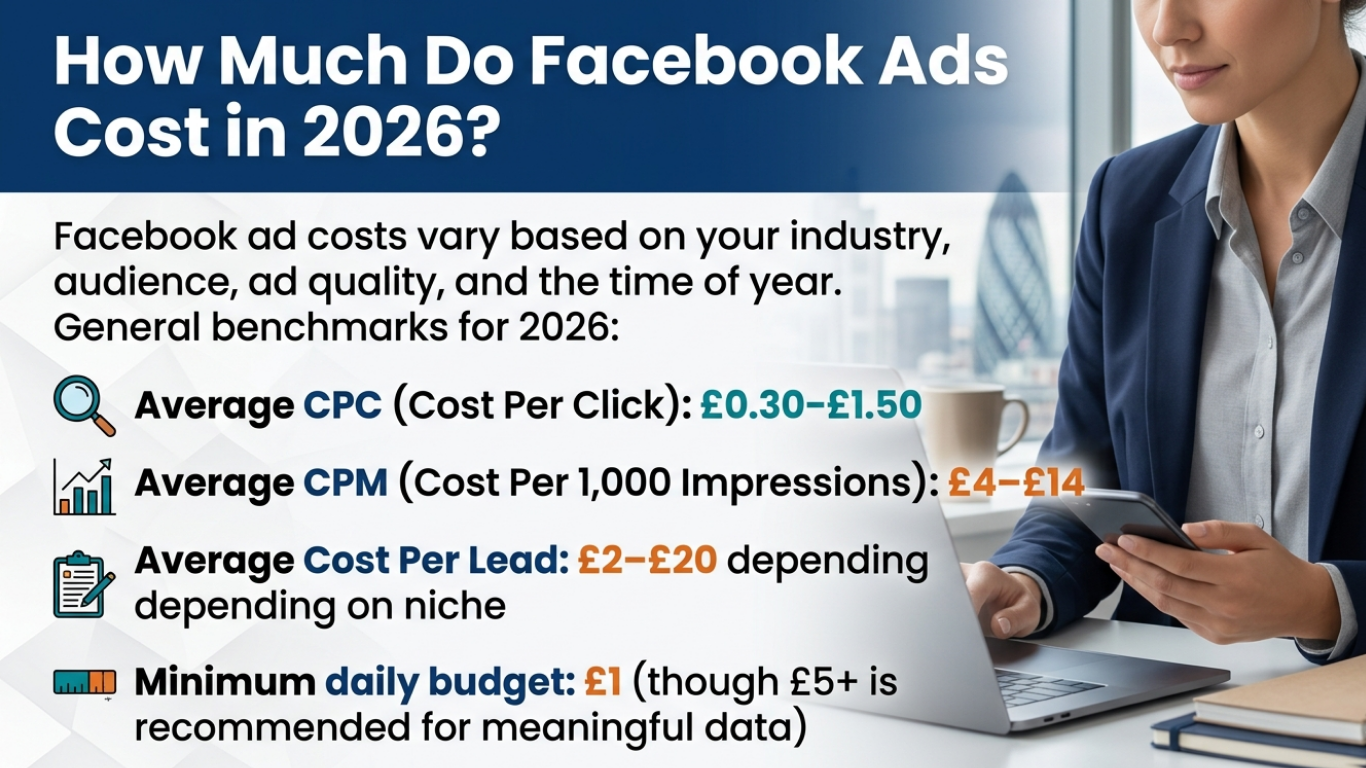
How Much Do Facebook Ads Cost in 2026?
Facebook ad costs vary based on your industry, audience, ad quality, and the time of year. General benchmarks for 2026:
- Average CPC (Cost Per Click): £0.30–£1.50
- Average CPM (Cost Per 1,000 Impressions): £4–£14
- Average Cost Per Lead: £2–£20 depending on niche
- Minimum daily budget: £1 (though £5+ is recommended for meaningful data)
Costs tend to spike during high-competition periods such as Black Friday, Christmas, and major sales events when more advertisers are bidding for the same audiences.
Frequently Asked Questions About Facebook Ads
Do Facebook ads work for small businesses? Yes. Facebook advertising is one of the most cost-effective paid channels for small businesses because you control your budget entirely and can start with as little as £5 per day. The advanced targeting ensures your budget reaches relevant potential customers rather than a random general audience.
How long does it take for Facebook ads to work? Most campaigns need 3–7 days to exit the learning phase before performance stabilises. Conversion campaigns need at least 50 conversion events per week for the algorithm to optimise properly.
Why is my Facebook ad not getting results? The most common reasons are: audience too broad or too narrow, low-quality ad creative, wrong campaign objective, budget too low, or not having the Facebook Pixel installed correctly.
What is the Facebook Pixel and do I need it? The Facebook Pixel is a tracking code you install on your website. It is essential for running conversion-based campaigns, retargeting website visitors, and building Lookalike Audiences. Any serious advertiser needs it.
Can I run Facebook ads without a website? Yes — you can use Lead Generation campaigns to collect contact details directly within Facebook without needing a website, or run campaigns that direct users to your Facebook Page or WhatsApp.
Conclusion
Facebook advertising remains one of the most powerful digital marketing tools available in 2026, offering unmatched targeting capabilities, flexible budgets, and measurable results across a platform with nearly 3 billion monthly active users.
The key to success is understanding how the auction system works, choosing the right campaign objective for your goal, building focused and relevant audiences, creating high-quality ad creatives, and using the Facebook Pixel to track and optimise performance over time.
Start small, test consistently, and scale what works.