Home Blog

How to Find Etsy Keywords That Sell: Complete Etsy Keyword Research Guide for Beginners (2026)

0
How to find keywords for Etsy using keyword research strategies
Learn how to find keywords for Etsy listings and improve your Etsy SEO strategy.

How to Find Keywords for Etsy: Complete Etsy Keyword Research Guide for Beginners (2026)

Starting an Etsy shop is easy, but getting your products discovered by buyers is the real challenge. Many new Etsy sellers create beautiful products, upload attractive images, and write descriptions, but their listings receive very little traffic because they are not targeting the right keywords.

Etsy is a search-based marketplace. Millions of shoppers visit Etsy every day and type specific words into the search bar to find products they want to purchase. If your listing uses the same words buyers are searching for, Etsy has a better chance of showing your product to the right audience.

Learning how to find keywords for Etsy is one of the most important skills for building a successful Etsy business. Keyword research helps you understand what customers are searching for, how they describe products, what phrases competitors are using, and which search terms can bring buyers who are ready to purchase.

The biggest mistake beginners make is choosing keywords based on what they personally call their product instead of thinking like a customer. Sellers often use creative names, but buyers usually search using simple phrases that describe the product, style, purpose, recipient, or occasion.

For example, a seller may create a product called a “Sunflower Dream Hat,” but buyers may search for:

  • crochet sunflower bucket hat
  • handmade summer hat
  • flower festival hat
  • boho crochet hat for women

The goal of Etsy keyword research is to discover these buyer-focused phrases and strategically use them in your listing.


What Are Etsy Keywords?

Etsy keywords are the words and phrases shoppers type into Etsy search when looking for products.

These keywords help Etsy understand:

  • What your product is
  • Who might want to buy it
  • Which searches your listing matches
  • When your product should appear in search results

Etsy uses information from different parts of your listing, including titles, tags, categories, attributes, and descriptions, to match products with shopper searches. Using accurate and relevant keywords improves your chances of appearing in front of interested buyers. Etsy

For example:

Broad keyword:

“hat”

This keyword has a huge audience but very unclear buyer intent.

A better Etsy keyword:

“crochet sunflower bucket hat”

This tells Etsy:

  • Product type: hat
  • Material/style: crochet
  • Design: sunflower
  • Buyer interest: fashion accessory

The more specific your keyword is, the easier it becomes to attract the right buyer.


Why Etsy Keyword Research Is Important

Many sellers think Etsy success depends only on creating good products. A great product is important, but visibility is equally important.

Imagine creating the best handmade necklace on Etsy, but nobody searches the words used in your title and tags. Your product may never reach potential customers.

Keyword research helps solve three major problems:

1. It helps Etsy understand your product

Etsy’s search system needs clear information to decide which shoppers should see your listing.

When your listing contains relevant keywords, Etsy can better connect your product with customer searches.


2. It helps you understand customer language

Customers may describe your product differently than you do.

For example:

Seller language:

“Handcrafted floral headwear”

Buyer language:

“flower crown for wedding”

The buyer’s phrase is usually more valuable because it reflects search behavior.


3. It helps you compete with established sellers

Popular Etsy categories can have thousands of sellers.

Instead of targeting extremely broad keywords like:

  • jewelry
  • shirt
  • planner
  • candle

you can target more specific long-tail keywords:

  • personalized birth flower necklace
  • minimalist wedding planner printable
  • handmade soy candle gift set

Long-tail keywords usually have lower competition and stronger purchase intent. Etsy


The Best Way to Find Keywords for Etsy

The most effective Etsy keyword research process combines multiple methods:

  1. Etsy search autocomplete
  2. Competitor analysis
  3. Customer language research
  4. Keyword research tools
  5. Trend analysis
  6. Product validation

Do not depend on only one method. The strongest keyword lists come from combining different sources.


Method 1: Use Etsy Search Bar Autocomplete

The Etsy search bar is one of the best free keyword research tools available.

Why?

Because Etsy autocomplete suggestions are based on real searches made by shoppers.

To use this method:

  1. Open Etsy
  2. Type your main product keyword
  3. Look at the suggested phrases
  4. Record relevant keywords

Example:

You sell crochet hats.

Start typing:

“crochet hat”

Etsy may suggest:

  • crochet bucket hat
  • crochet flower hat
  • crochet summer hat
  • crochet hat for women
  • handmade crochet hat

These suggestions reveal how buyers search.

Create a keyword list:

Keyword Intent
crochet hat General product
crochet bucket hat Specific style
crochet flower hat Design-focused
crochet hat for women Audience-focused
handmade crochet hat Handmade buyer

Etsy itself recommends brainstorming keywords and using search terms that match how shoppers search for products. Etsy


Method 2: Analyze Successful Etsy Competitors

Your competitors can reveal valuable keyword opportunities.

Find successful listings in your niche and study:

  • Titles
  • Tags
  • Categories
  • Attributes
  • Descriptions
  • Customer reviews

Do not copy their listings.

Instead, identify patterns.

For example, analyze 10 top listings for:

“crochet flower hat”

You may notice repeated phrases:

  • summer hat
  • festival accessory
  • boho style
  • handmade gift
  • women’s fashion

These repeated terms are keyword signals.


Method 3: Use Customer Reviews To Find Keywords

Customer reviews are an underrated keyword source.

Buyers naturally describe products using emotional and practical words.

Example review:

“I bought this beautiful beach hat for my Hawaii vacation.”

Possible keywords:

  • beach hat
  • vacation accessory
  • summer travel hat

Another review:

“This was the perfect birthday gift for my sister.”

Possible keywords:

  • birthday gift
  • gift for sister
  • handmade gift

How to Start an Etsy Shop

0
How to open Etsy shop

How to Start an Etsy Shop in 2026: Complete Beginner Guide

Starting an Etsy shop is one of the easiest ways to turn your creativity into an online business. Whether you want to sell handmade products, digital downloads, vintage items, or creative designs, Etsy provides a platform where millions of buyers search for unique products every day.

Many beginners think opening an Etsy shop is complicated, but the process is simple when you understand the correct steps. You need a good product idea, a seller account, optimized listings, and a strategy to attract customers.

However, creating an Etsy shop is only the beginning. Success depends on choosing the right products, understanding Etsy search, creating attractive listings, and building trust with buyers.

This guide explains how to start an Etsy shop step by step, how much it costs, what products you can sell, how Etsy SEO works, and how beginners can get their first sale.

What Is Etsy and Why Do People Start Selling on Etsy?

Etsy is an online marketplace where independent sellers sell handmade products, digital items, vintage goods, and craft supplies. Unlike traditional eCommerce platforms, Etsy focuses on creative products and unique items made by small businesses.

Millions of buyers visit Etsy to find products they cannot easily get from regular stores. This creates opportunities for creators, designers, artists, and small business owners.

People start Etsy shops for different reasons:

  • To build a side income
  • To sell handmade creations
  • To turn hobbies into businesses
  • To sell digital products without inventory
  • To create a personal brand online

One major advantage of Etsy is the low barrier to entry. You do not need a physical store, expensive equipment, or a large investment to begin. A person can start with simple products and grow over time.

However, Etsy is not an instant money-making platform. Successful sellers usually spend time researching products, improving listings, learning keywords, and understanding customer needs.

Things to Know Before Starting an Etsy Shop

Before opening your Etsy store, it is important to understand how the platform works. Many beginners make mistakes because they start uploading products without research.

Etsy Success Requires Planning

Creating an account takes only a few minutes, but building a profitable shop requires preparation.

Before launching your store, think about:

  • What products will you sell?
  • Who are your customers?
  • Why should buyers choose your products?
  • How will you make your listings different?

A successful Etsy shop is built around solving customer needs. Instead of creating random products, research what people are already searching for.

Etsy Is Not Instant Passive Income

Many beginners discover Etsy because they hear stories about sellers making thousands of dollars. While Etsy can become a profitable business, it usually requires consistent effort.

Successful sellers focus on:

  • Creating quality products
  • Adding new listings regularly
  • Improving product photos
  • Learning Etsy SEO
  • Understanding customer behavior

Treat your Etsy shop like a real business instead of expecting immediate results.

Choose Your Product Category Carefully

Your product choice can directly affect your success.

Popular Etsy categories include:

  • Digital downloads
  • Printable planners
  • Crochet patterns
  • Wedding templates
  • Handmade jewelry
  • Home decorations
  • Personalized gifts
  • SVG files
  • Clothing designs

A good product has three important qualities:

  1. People are searching for it
  2. Customers are willing to pay for it
  3. Competition is manageable

What Do You Need to Start an Etsy Shop?

Starting an Etsy shop does not require complicated tools. You mainly need basic information and products ready for listing.

Here are the main requirements:

Requirement Details
Etsy account Create a seller account on Etsy
Shop name Choose a unique brand name
Product idea Decide what you want to sell
Product images Upload clear and attractive photos
Product description Explain features and benefits
Payment details Add banking information
Pricing strategy Set profitable prices

For digital products, you also need properly prepared files such as PDFs, PNGs, templates, or downloadable resources.

For physical products, you should prepare packaging, shipping information, and inventory management.


How to Start an Etsy Shop Step by Step

Starting an Etsy shop follows a simple process. Follow these steps carefully to create your store correctly.

Create Your Etsy Seller Account

The first step is creating an Etsy account.

Visit Etsy and choose the option to sell on Etsy. You can create a new account or use an existing Etsy buyer account.

During registration, you will provide:

  • Email address
  • Password
  • Personal information

After creating your account, Etsy will guide you through the seller setup process.

Choose Your Shop Preferences

Etsy will ask you to select important shop settings.

These include:

  • Shop language
  • Country location
  • Currency

Choose these settings carefully because they affect how customers view your store.

Your currency should match your target market. For example, sellers targeting US customers often use US dollars.

Pick a Memorable Shop Name

Your Etsy shop name represents your brand.

A good shop name should be:

  • Easy to remember
  • Simple to spell
  • Related to your products
  • Professional

Avoid using complicated names with unnecessary numbers or symbols.

Before choosing a name, check:

  • Availability on Etsy
  • Domain availability if you want a future website
  • Social media username availability

A strong brand name can help customers remember your business.

Add Your First Product Listing

Your first listing is an important step because it shows Etsy what your shop offers.

A complete Etsy listing includes:

  • Product photos
  • Product title
  • Description
  • Category
  • Price
  • Tags
  • Shipping information

Your product title should describe what buyers search for.

For example:

Weak title:

“Beautiful Planner”

Better title:

“Printable Weekly Planner PDF | Digital Planner Template for Busy Professionals”

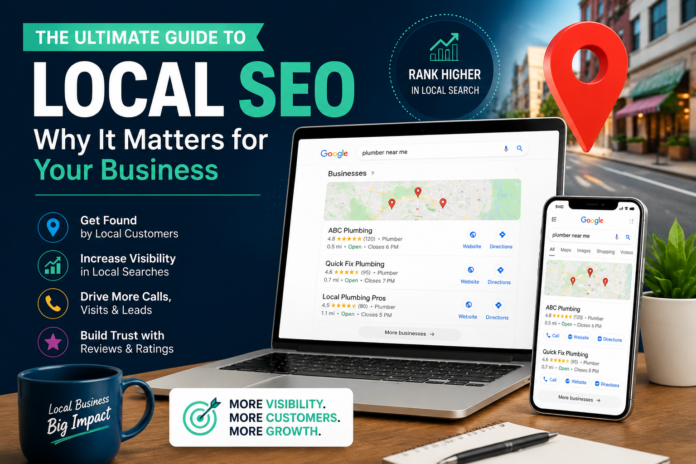
Guide to Local SEO

0
Local SEO helps businesses improve online visibility and attract nearby customers

The Ultimate Guide to Local SEO: Why It Matters for Your Business

When people need a service today, they usually do not open a phone book or ask several friends for recommendations first. They search online.

Someone looking for a dentist, plumber, lawyer, restaurant, or marketing agency will often search phrases like:

  • “dentist near me”
  • “best plumber in Phoenix”
  • “local SEO company near me”
  • “emergency repair service open now”

The businesses that appear at the right moment are the ones that get the calls, website visits, and customers.

This is where Local SEO becomes important.

Local SEO helps businesses improve their visibility in location-based searches so potential customers can find them when they are actively looking for their services. It is not only about ranking a website. It is about making sure Google understands who you are, what you offer, where you operate, and why customers should trust you.

For small and local businesses, strong local visibility can be the difference between being discovered by new customers or being ignored while competitors take those opportunities.

What Is Local SEO?

Local SEO (Local Search Engine Optimization) is the process of improving your online presence so your business appears in searches related to your location and services.

For example, when someone searches:

“best coffee shop near me”

Google does not simply show the most popular coffee shops in the world. It tries to show businesses that are:

  • Close to the searcher
  • Relevant to the search
  • Trusted by customers
  • Clearly connected to that location

Unlike traditional SEO, which often focuses on ranking nationally or globally, Local SEO focuses on attracting customers from a specific area.

A business in Phoenix does not need to compete with every marketing agency in the world. It needs to become visible to people searching for marketing services in Phoenix and nearby areas.

That is why Local SEO is especially valuable for:

  • Home service companies
  • Medical practices
  • Restaurants
  • Law firms
  • Real estate businesses
  • Local retailers
  • Professional service providers

Local SEO vs Traditional SEO

Traditional SEO and Local SEO share many principles, but their goals are different.

Traditional SEOLocal SEO
Targets a wider audience Targets customers in specific locations
Focuses heavily on website rankings Focuses on maps, local searches, and nearby customers
Uses content and backlinks as major signals Uses GBP, reviews, citations, and location signals
Often targets informational searches Often targets customers ready to buy

A national website may want thousands of visitors from different countries.

A local business usually wants something more valuable:

A customer nearby who is ready to call, book, visit, or purchase.

Why Is Local SEO Important?

Consumer behavior has changed.

People no longer spend hours searching through different websites. They expect Google to quickly provide the best local options.

Local SEO matters because it helps businesses appear during these high-intent moments.

1. Customers Search Before They Buy

Many local searches happen when people already need a solution.

For example:

A homeowner searching “roof repair near me” is probably not just researching roofing. They may need someone to fix a problem today.

A person searching “emergency dentist open now” is likely looking for immediate help.

These searches have strong buying intent.

2. Google Maps Has Become a Major Customer Channel

For many local businesses, Google Maps is just as important as their website.

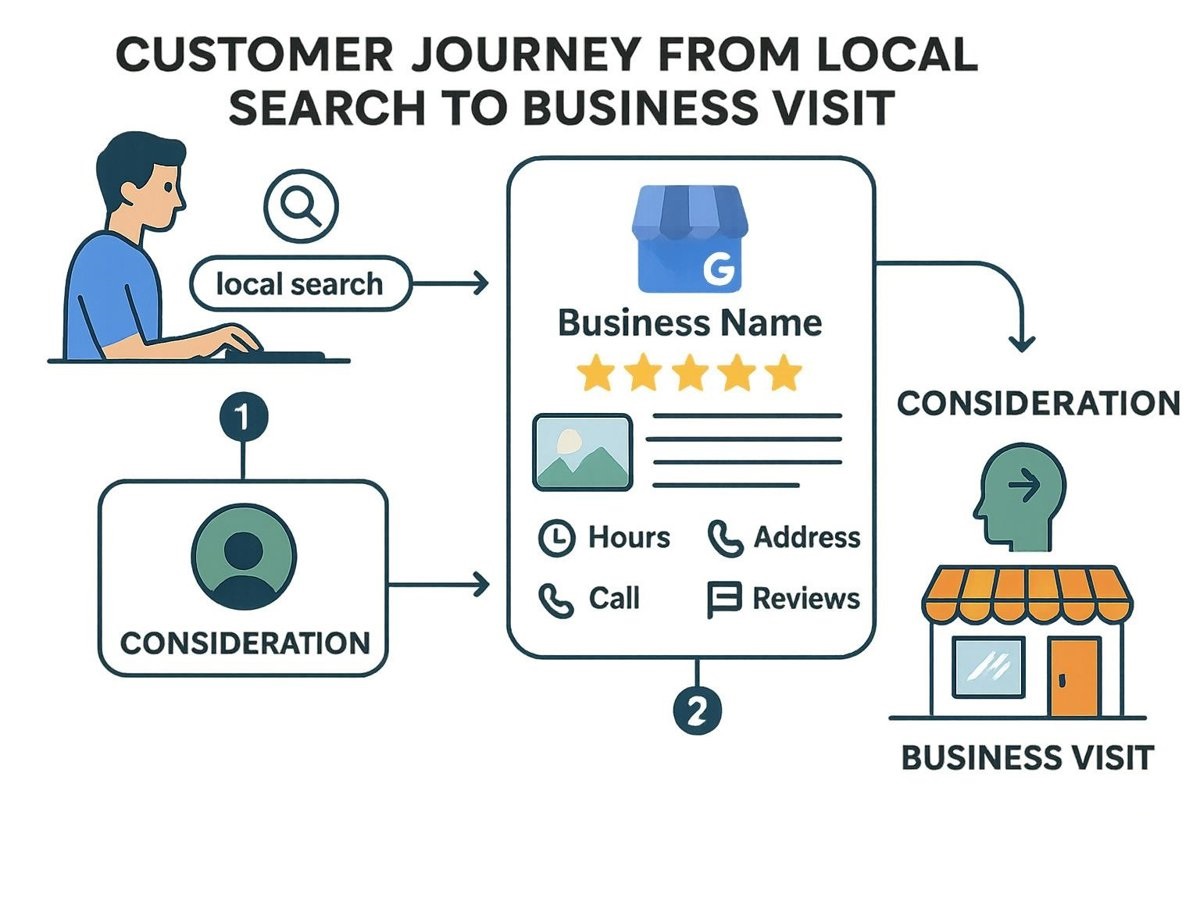
The Google Local Pack (the map results that appear at the top of many local searches) gives users important information immediately:

  • Business name
  • Location
  • Reviews
  • Phone number
  • Website
  • Directions
  • Opening hours

If your business is missing from these results, customers may never discover you.

3. Local SEO Helps Small Businesses Compete

A small business usually cannot compete with large companies for broad national keywords.

For example:

Ranking for “insurance company” would be extremely difficult.

But ranking for:

“insurance company in Scottsdale”

is much more achievable with the right local strategy.

Local SEO allows smaller businesses to compete by focusing on their actual service areas.

Before vs After Local SEO

A business without Local SEO often struggles with visibility and customer acquisition.

Before Local SEO:

  • Website receives little organic traffic
  • Google Business Profile is incomplete
  • Few customer reviews
  • Incorrect business information across directories
  • Competitors appear higher in search results
  • Leads depend heavily on advertisements and referrals

After Effective Local SEO:

  • Business appears in local search results
  • Google Business Profile attracts more visitors
  • Customers find accurate contact information
  • Reviews build trust
  • Website receives targeted local traffic
  • More calls, bookings, and inquiries come from search

Local SEO does not create overnight success, but it builds a long-term customer acquisition system.

Local SEO process connecting customers with businesses

How Google Decides Which Local Businesses Rank?

Google does not rank local businesses randomly.

It evaluates many signals to decide which businesses provide the best answer for a search.

The main factors include:

Relevance

Google wants to understand whether your business matches what the customer is searching for.

For example, a bakery should clearly communicate:

  • What products it sells
  • Where it operates
  • What makes it different

Clear information helps Google connect your business with relevant searches.

Distance

Location matters in Local SEO.

A customer searching for a restaurant usually wants options nearby, not a restaurant located hundreds of miles away.

Google considers the searcher’s location and the business location when showing results.

Trust and Reputation

Reviews are one of the strongest trust signals for local businesses.

A business with:

  • Many positive reviews
  • Recent customer feedback
  • Professional responses

often appears more trustworthy to both customers and search engines.

The Role of Google Business Profile

Your Google Business Profile is one of the most important parts of Local SEO.

Think of it as your online storefront.

A properly optimized profile should include:

  • Correct business name
  • Accurate address and phone number
  • Proper business category
  • Complete services
  • Business description
  • Quality photos
  • Updated hours
  • Regular posts
  • Customer reviews

Many businesses create a profile but never optimize it. This means they miss opportunities to appear for valuable searches.

Semantic SEO and Why Context Matters

Search engines have become much smarter.

Years ago, businesses could rank by repeating the same keyword many times.

Today, Google tries to understand meaning and context.

For example, a local SEO agency should not only mention “local SEO.”

It should also explain related topics such as:

  • Google Business Profile optimization
  • Local keyword research
  • Review management
  • Citation building
  • Local landing pages
  • Technical SEO
  • Schema markup

This helps search engines understand the complete expertise of the business.

How AI and Search Technology Are Changing Local SEO

Search engines are increasingly using artificial intelligence to understand questions and provide better answers.

People are also searching in more conversational ways.

Instead of typing:

“SEO agency Phoenix”

someone might ask:

“Which SEO company in Phoenix helps small businesses get more Google Maps visibility?”

Modern Local SEO requires businesses to create clear, helpful information that answers real customer questions.

Businesses should focus on:

  • Accurate information
  • Helpful content
  • Strong reviews
  • Consistent business details
  • Clear service descriptions

The Five Main Parts of a Successful Local SEO Strategy

1. Google Business Profile Optimization

A strong GBP strategy includes:

  • Choosing the correct primary category
  • Adding relevant services
  • Uploading real business photos
  • Publishing updates
  • Responding to reviews

Your profile should clearly communicate what your business does.

2. Location-Based Website Content

Your website should support your local visibility.

Important elements include:

  • Service pages
  • Location pages
  • Local keywords
  • Customer testimonials
  • Business information

Each page should provide real value instead of simply changing a city name.

3. Technical SEO

Technical problems can prevent search engines from understanding your website.

Important areas include:

  • Fast loading speed
  • Mobile-friendly design
  • Proper schema markup
  • Clear website structure
  • Secure website connection

4. Reviews and Citations

Local businesses need strong reputation signals.

This includes:

  • Getting genuine customer reviews
  • Responding professionally
  • Maintaining consistent business information across directories

Your business details should match everywhere online.

5. Local Link Building

Links from trusted local sources can strengthen your authority.

Examples include:

  • Local organizations
  • Business associations
  • Community websites
  • Local partnerships
  • Industry-related websites

Local connections help search engines understand your presence in a specific area

How to Perform a Local SEO Audit

Before creating a strategy, businesses should review their current position.

A basic Local SEO audit should check:

Google Business Profile

  • Is the profile complete?
  • Are categories correct?
  • Are there duplicate listings?
  • Are reviews being managed?

Website

  • Are location pages optimized?
  • Are services clearly explained?
  • Is the website mobile-friendly?

Citations

  • Is business information consistent?
  • Are important directories updated?

Competitors

Analyze:

  • Who ranks in the map results?
  • How many reviews do they have?
  • What services do they highlight?

Understanding competitors helps identify opportunities.

Conclusion

Local SEO is no longer optional for businesses that depend on local customers.

People search online before choosing where to spend their money. If your business does not appear when customers are searching, your competitors will receive those opportunities instead.

A strong Local SEO strategy combines:

  • Google Business Profile optimization
  • Helpful local content
  • Customer reviews
  • Technical improvements
  • Local authority building

The goal is simple:

Help the right customers find your business at the exact moment they need your services.

How Do Facebook Ads Work? Complete Beginner’s Guide 2026

0
How Facebook ads work step by step diagram for beginners 2026

How Do Facebook Ads Work? The Core Process

Facebook advertising works through a real-time auction system. Every time a user opens Facebook or Instagram, Meta runs an instant auction to decide which ads to show that person based on three factors:

1. Advertiser Bid — how much you are willing to pay for a result (click, impression, conversion) 2. Estimated Action Rate — how likely the user is to respond to your ad based on past behaviour 3. Ad Quality and Relevance — how relevant and engaging your ad is to that specific person

The advertiser with the highest combined score wins the placement. This means having a great, relevant ad can beat a competitor spending more money.

Facebook Ads Campaign Structure (3 Levels)

Understanding the structure of a Facebook campaign is essential before you spend a single penny.

Level 1 — Campaign

This is where you choose your marketing objective. Meta groups objectives into three categories:

  • Awareness — Brand Awareness, Reach
  • Consideration — Traffic, Engagement, App Installs, Video Views, Lead Generation, Messages
  • Conversion — Conversions, Catalogue Sales, Store Traffic

Your objective tells Facebook’s algorithm what outcome to optimise for. If you select Traffic, Facebook will show your ad to people in your audience most likely to click links. If you select Conversions, it will show your ad to people most likely to complete a purchase or form submission.

Tip for beginners: Start with Traffic to build data, then switch to Conversions once your Facebook Pixel has collected at least 50 conversion events per week.

Level 2 — Ad Set

Inside each campaign, you create one or more ad sets. This is where you define:

  • Audience (who sees your ad)
  • Placements (where your ad appears)
  • Budget (how much to spend)
  • Schedule (when your ad runs)

Level 3 — Ad

This is the actual creative your audience sees — the image or video, headline, body text, and call-to-action button.

Facebook Ad Targeting: How to Reach the Right People

One of the most powerful aspects of Facebook advertising is the targeting system. Meta has collected data on billions of users, allowing advertisers to reach very specific audiences.

Core Audiences (Interest and Demographic Targeting)

You can target users based on:

  • Location — country, region, city, postcode, or radius around a location
  • Age — from 18 to 65+
  • Gender — all genders, men, or women
  • Languages — useful for multilingual markets
  • Interests — pages users have liked, content they engage with (e.g. digital marketing, fitness, travel)
  • Behaviours — purchase behaviour, device usage, travel habits
  • Demographics — education level, job title, relationship status, parental status

Important tip: Avoid targeting audiences that are too broad. An audience of 50 million people may sound impressive, but a focused audience of 500,000 highly relevant users will produce a much lower cost per result.

Custom Audiences

Custom Audiences let you target people who have already interacted with your business. You can create custom audiences from:

  • Your website visitors (via Facebook Pixel)
  • Your customer email list
  • People who watched your videos on Facebook or Instagram
  • People who interacted with your Instagram profile
  • People who messaged your page

Custom Audiences are powerful for retargeting campaigns — showing ads to people who visited your product page but did not buy, for example.

Lookalike Audiences

Once you have a Custom Audience, you can ask Meta to find new users who share similar characteristics. This is called a Lookalike Audience.

For example, if you upload a list of 1,000 existing customers, Facebook will analyse their shared traits and find millions of similar users in your chosen country. A 1% Lookalike Audience is the most similar (and smallest); a 10% Lookalike Audience is broader but larger.

Lookalike Audiences are considered one of the most effective Facebook ad targeting strategies available.

Facebook Ad Formats Explained

Meta supports multiple ad formats, each suited to different goals and placements.

Image Ads

The simplest format — a single static image with headline, body text, and a call-to-action button. Best for driving website traffic and brand awareness. Recommended image size: 1200 x 628px.

Video Ads

Video ads autoplay in the Facebook and Instagram feed. They are highly effective for storytelling, product demonstrations, and building brand recall. Ideal length: 15–30 seconds for feed; 6–15 seconds for stories.

Carousel Ads

Carousel ads display 2–10 images or videos in a swipeable format. Each card can have its own headline, description, and link. Ideal for showcasing multiple products, features, or steps in a process.

Collection Ads

Collection ads feature a hero image or video followed by four product images below. When tapped on mobile, they open into a full-screen Instant Experience. Best for e-commerce businesses running catalogue campaigns.

Stories Ads

Full-screen vertical ads that appear between organic Stories on Facebook and Instagram. They feel native to the platform and generate strong engagement. Recommended size: 1080 x 1920px.

Instant Experience Ads (formerly Canvas)

A full-screen mobile landing page that loads instantly within Facebook. You can combine images, videos, carousels, and buttons without the user leaving the app.

Where Do Facebook Ads Appear? (Placements)

Facebook ads can appear across multiple placements within the Meta ecosystem:

  • Facebook News Feed (desktop and mobile)
  • Facebook Right Column (desktop only)
  • Facebook Stories
  • Facebook Reels
  • Instagram Feed
  • Instagram Stories
  • Instagram Reels
  • Messenger Inbox
  • Audience Network (external apps and websites)

Meta recommends using Advantage+ Placements (formerly Automatic Placements), which lets the algorithm distribute your budget across all eligible placements to find the best results. However, experienced advertisers often manually select placements to maintain more control.

How Facebook Ad Bidding Works

Facebook ads operate on a bidding system — you compete in a real-time auction against other advertisers targeting the same audience.

Bid Strategies

  • Lowest Cost (Automatic Bidding) — Meta spends your budget to get the most results at the lowest cost. Best for beginners.
  • Cost Cap — You set a maximum average cost per result, and Meta tries to stay under it.
  • Bid Cap — You set the maximum bid you are willing to place in each auction.
  • Value Optimisation — Meta shows ads to users most likely to generate the highest purchase value (requires Facebook Pixel data).

Budget Options

You can set either a Daily Budget (spent approximately each day) or a Lifetime Budget (total amount spent over the campaign duration). You can start with as little as £1–£5 per day for testing.

The Facebook Pixel: The Engine Behind Smart Targeting

The Facebook Pixel is a small piece of JavaScript code you install on your website. It tracks what visitors do after clicking your ad — page views, add-to-cart events, purchases, form completions, and more.

The Pixel is essential because it:

  • Allows you to create retargeting audiences from website visitors
  • Enables Conversion campaigns by telling Meta which users are most likely to convert
  • Feeds data into Lookalike Audiences
  • Powers dynamic product ads for e-commerce

If you run a WordPress website, you can install the Pixel using the Meta Pixel WordPress plugin or through Google Tag Manager without touching any code.

How to Set Up Your First Facebook Ad Campaign (Step by Step)

Step 1 — Create a Meta Business Account

Go to business.facebook.com and create a Meta Business Suite account. Connect your Facebook Page and add your payment method.

Step 2 — Open Meta Ads Manager

Navigate to Ads Manager and click Create to start a new campaign.

Step 3 — Choose Your Campaign Objective

Select the objective that matches your goal. For a beginner trying to get website visitors, choose Traffic. For generating leads, choose Lead Generation.

Step 4 — Define Your Ad Set

Set your target audience, placements, budget, and schedule. For a first campaign, start with a broad audience of 500,000–2 million and a daily budget of £5–£10.

Step 5 — Create Your Ad

Upload your image or video, write your headline (40 characters recommended), primary text (up to 125 characters for above-the-fold visibility), and choose your call-to-action button (Shop Now, Learn More, Sign Up, etc.).

Step 6 — Review and Publish

Use the Ad Preview tool to check how your ad looks across different placements. When satisfied, click Publish. Meta will review your ad (usually within 24 hours) before it goes live.

How to Measure Facebook Ad Performance

Tracking the right metrics is essential to understanding whether your campaigns are working.

Metric What It Measures Good Benchmark
CTR (Click-Through Rate) % of people who clicked your ad Above 1% for feed ads
CPC (Cost Per Click) Average cost per link click £0.20–£1.50 depending on niche
CPM (Cost Per 1,000 Impressions) Cost to reach 1,000 people £3–£12 on average
ROAS (Return on Ad Spend) Revenue generated per £1 spent 3x or higher for e-commerce
Frequency Average times each person sees your ad Keep below 3–4 to avoid ad fatigue
Conversion Rate % of ad clicks that result in your goal action Varies by industry
Relevance Score Meta’s rating of ad quality (1–10) Aim for 7+

Common Facebook Ads Mistakes Beginners Make

Mistake 1 — Targeting an audience that is too broad A massive audience of 10+ million people dilutes your budget. Start with focused interest targeting of 300,000–1 million.

Mistake 2 — Ending campaigns too early Facebook’s algorithm needs a learning phase of approximately 50 conversion events before it optimises fully. Do not stop a campaign within the first 3–7 days.

Mistake 3 — Not installing the Facebook Pixel Running campaigns without the Pixel means you cannot track conversions, retarget visitors, or build Lookalike Audiences.

Mistake 4 — Using low-quality creatives Your ad image or video is the first thing users notice. Blurry, cluttered, or generic visuals result in low engagement and high costs.

Mistake 5 — Ignoring mobile optimisation Over 90% of Facebook users access the platform on mobile. Always preview your ads on mobile before publishing.

Mistake 6 — Not A/B testing Always test multiple versions of your ad — different images, headlines, and audiences — to find what performs best before scaling your budget.

Facebook Ads vs Boosted Posts: What is the Difference?

A common question for beginners is whether to boost a post or run a proper Facebook ad campaign through Ads Manager.

Feature Boosted Post Ads Manager Campaign
Setup Simple — 3 clicks More detailed
Objective options Limited (Engagement, Reach, Messages) Full range (Traffic, Conversions, Leads, etc.)
Audience targeting Basic Advanced (Custom, Lookalike, detailed interests)
Ad formats Post format only All formats
Pixel tracking Limited Full conversion tracking
Best for Quick reach on existing content Serious campaigns with measurable ROI

For anyone serious about results, Ads Manager is always the better choice.

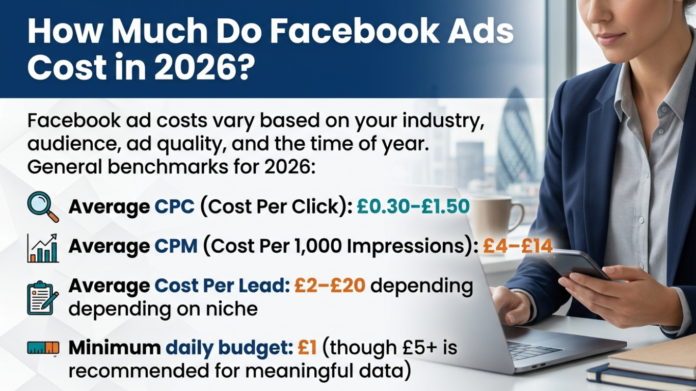
How Much Do Facebook Ads Cost in 2026?

Facebook ad costs vary based on your industry, audience, ad quality, and the time of year. General benchmarks for 2026:

  • Average CPC (Cost Per Click): £0.30–£1.50
  • Average CPM (Cost Per 1,000 Impressions): £4–£14
  • Average Cost Per Lead: £2–£20 depending on niche
  • Minimum daily budget: £1 (though £5+ is recommended for meaningful data)

Costs tend to spike during high-competition periods such as Black Friday, Christmas, and major sales events when more advertisers are bidding for the same audiences.

Frequently Asked Questions About Facebook Ads

Do Facebook ads work for small businesses? Yes. Facebook advertising is one of the most cost-effective paid channels for small businesses because you control your budget entirely and can start with as little as £5 per day. The advanced targeting ensures your budget reaches relevant potential customers rather than a random general audience.

How long does it take for Facebook ads to work? Most campaigns need 3–7 days to exit the learning phase before performance stabilises. Conversion campaigns need at least 50 conversion events per week for the algorithm to optimise properly.

Why is my Facebook ad not getting results? The most common reasons are: audience too broad or too narrow, low-quality ad creative, wrong campaign objective, budget too low, or not having the Facebook Pixel installed correctly.

What is the Facebook Pixel and do I need it? The Facebook Pixel is a tracking code you install on your website. It is essential for running conversion-based campaigns, retargeting website visitors, and building Lookalike Audiences. Any serious advertiser needs it.

Can I run Facebook ads without a website? Yes — you can use Lead Generation campaigns to collect contact details directly within Facebook without needing a website, or run campaigns that direct users to your Facebook Page or WhatsApp.

Conclusion

Facebook advertising remains one of the most powerful digital marketing tools available in 2026, offering unmatched targeting capabilities, flexible budgets, and measurable results across a platform with nearly 3 billion monthly active users.

The key to success is understanding how the auction system works, choosing the right campaign objective for your goal, building focused and relevant audiences, creating high-quality ad creatives, and using the Facebook Pixel to track and optimise performance over time.

Start small, test consistently, and scale what works.

Rank YouTube Videos on the First Page of Google

0
How to Rank

How to Rank

How to rank on google

 Rank YouTube Videos on Google

In the modern digital landscape, creating a great video is only half the battle. With over 2 billion monthly users on YouTube, your content can easily get lost in the noise unless you optimize for both YouTube and Google search results. Currently, more than 55% of Google search results include video content, making Google’s first page the ultimate destination for creators seeking maximum visibility.

To achieve that coveted “first line” ranking, you must move beyond simple keyword stuffing and focus on Video Architecture and Semantic Authority.

1. Master Strategic Keyword Research

The foundation of any high-ranking video is understanding search intent.

  • YouTube Search Suggest: Use the “suggest” feature to find phrases actual users are typing into the search bar.

  • Competitor Intelligence: Analyze top-ranking videos in your niche to see which titles, descriptions, and tags they are using to maintain their position.

  • Long-Tail Focus: Target specific, high-intent phrases like “how-to,” “tutorials,” or “reviews,” as these are most likely to trigger video-rich snippets on Google.

2. Implement an “Answer-First” Hook

Modern search algorithms evaluate the first few seconds of your video to determine its relevance.

  • Front-Load the Solution: State your main takeaway or answer the core question within the first sentence of your video.

  • Boost Retention: YouTube upgrades the position of videos that keep viewers hooked; avoid long, generic intros that cause engagement to drop.

3. Optimize Video Architecture for Crawlers

Google doesn’t just “watch” your video; it “reads” the structure you provide.

  • Timestamp Architecture: Use descriptive timestamps in your description (e.g., “How to find low-competition keywords”) to help Google surface “Key Moments” directly in search results.

  • Transcript Precision: Upload a manual transcript rather than relying on automated AI versions to ensure industry-specific terminology is indexed correctly.

  • Video Length: While shorter videos are common, Google often favors videos longer than two minutes that provide deep, valuable information rather than quick sales pitches.

4. The Power of Metadata and CTR

Your metadata acts as a roadmap for search engine spiders.

  • Keyword-Rich Descriptions: Write at least 200 words of unique content for your description, incorporating your focus keyword, “How to Rank YouTube Videos,” naturally.

  • High-Quality Thumbnails: Avoid the default random frames; create custom thumbnails with bold colors to improve your Click-Through Rate (CTR), which is a major ranking factor.

  • File Naming Conventions: Rename your raw video file to include your target keyword before you even upload it to the platform.

5. Build Authority Through Social Signals

Google ranks videos higher when they show strong engagement across the web.

  • Social Media Integration: Link and sync your YouTube channel with active social accounts to drive initial shares and tweets.

  • Strategic Backlinks: Embed your video in relevant blog posts and forums to build the authority required to compete with established creators.

The Video Ranking Checklist

Before you hit publish, ensure your video meets these criteria:

  • Does the video answer the core question in the first 10 seconds?

  • Is the focus keyword included in the first half of the title?

  • Have you included at least three descriptive timestamps?

  • Is the transcript accurate and free of filler language?

  • Does the custom thumbnail avoid clickbait while remaining eye-catching?

Final Thought

Ranking #1 is no longer about “tricks”—it is about clarity. When you align your spoken script, visual aids, and metadata into a single narrative system, search engines can confidently recommend your content to users.

facebook ads updates october 2025

0
facebook ads updates october 2025

Meta AI News October 2025: The Definitive Guide to the Andromeda Era

The digital marketing landscape reached a historic turning point in late 2025. While the final quarter is traditionally defined by high CPMs and holiday surges, the Meta AI news October 2025 cycle introduced a fundamental shift: the transition from “Targeting by Demographics” to “Targeting by Intent.”

With the global rollout of the Andromeda ad delivery system and the integration of conversational AI into the advertising ecosystem, Meta has effectively turned every user interaction into a real-time targeting signal. For professional digital marketers, understanding these shifts is no longer optional—it is the baseline for survival in 2026.

 1. The Core of Meta AI News October 2025: Conversational Intent

The most disruptive update this month is Meta’s decision to use Meta AI chat interactions to influence ad delivery.

From Passive Signals to Active Queries

Previously, Meta’s algorithm relied on “passive signals”—what you liked, who you followed, and how long you watched a Reel. Starting in October 2025, the system began incorporating “active intent.”

  • Real-World Example: If a user asks Meta AI on WhatsApp, “What are the best eco-friendly running shoes for flat feet?” they have provided a high-intent signal.

  • The Impact: Under the new Andromeda model, that user will immediately see ads for sustainable footwear, even if they have never “liked” a fitness page.

  • The Timeline: Notifications began on October 7, 2025, with the full integration going live on December 16, 2025.

Privacy & Sensitive Topics

Meta has clarified that while chats are used for personalization, conversations regarding sensitive topics (religion, health, sexual orientation, or political views) are strictly excluded from the ad-targeting data pool to maintain compliance with global privacy standards.

2. Andromeda & The “Creative-First” Revolution

The “Andromeda” update represents the most significant re-engineering of the Meta Ads Manager since 2022. It moves the “brain” of the auction from the audience tab to the creative tab.

The Death of Manual Micro-Targeting

As highlighted in the Meta AI news October 2025 reports, manual audience building is becoming less effective than Broad Targeting.

  • Creative Retrieval: Andromeda scans billions of ad variations per second. It uses computer vision and natural language processing (NLP) to understand what is inside your video or image.

  • Autonomous Matching: The AI now decides who sees the ad based on the creative’s resonance. If your ad features a “luxury minimalist watch,” the AI finds the luxury audience automatically.

  • Efficiency Gains: Internal Meta benchmarks for Q4 2025 show that Advantage+ Shopping Campaigns using Andromeda reported a 32% reduction in CPA and a 22% increase in conversion rates compared to manual setups.

3. Advantage+ Everything: Automation as the Standard

October 2025 marked the official “sunset” of several manual legacy tools, replaced by the Advantage+ Suite.

Key Automation Milestones:

  • Advantage+ Catalog Ads: Now include “Dynamic Media” by default. The AI can automatically turn your static catalog images into short-form videos or motion graphics.

  • Advantage+ Creative Enhancements: Meta can now auto-adjust the brightness of your images, add high-performing background music to silent videos, and even generate alternate backgrounds to see which environment drives the most clicks.

  • Restricted Words Tool: To balance this AI power, Meta introduced a “Restricted Words” list. Advertisers can now block the AI from using specific terms (e.g., “Free,” “Miracle,” or “Cheap”) in its automated text variations to protect brand voice.

4. Ads Insights API: Breaking Changes for 2026

While Meta is giving more power to AI, it is tightening the reins on historical data. As per the technical updates released by Chris Cutlip, developers and agencies must prepare for major shifts in the Ads Insights API effective January 12, 2026.

Critical Deprecations Table

Metric / Parameter Change Effective Jan 12, 2026 Strategy Shift
7-day & 28-day View Deprecated / No longer returned Move to 1-day Click or 1-day View
Unique-Count Fields Limited to 13 months of history Export and store your own historical data
Hourly Breakdowns Limited to 13 months of history Use for short-term optimization only
Frequency Breakdowns Limited to 6 months of history Monitor ad fatigue in real-time
MMM (Marketing Mix) Limited to Asynchronous jobs Adjust reporting automation scripts

Pro Tip: If your agency relies on long-term attribution modeling (e.g., 28-day view), you must transition to the Conversions API (CAPI) and server-side tracking immediately to maintain data integrity.

5. Regional Restrictions: EU & UK Shifts

The Meta AI news October 2025 cycle was also heavily influenced by the regulatory landscape in Europe.

  • EU Political Ad Ban: To comply with transparency laws, Meta has officially blocked all political and social issue ads within the European Union. Marketers in the nonprofit and advocacy sectors must pivot to organic community building and “Threads Communities.”

  • UK “Pay or Consent”: The UK’s ICO-approved “Pay or Consent” model means some users will opt for an ad-free experience for a monthly fee. Expect a slight increase in CPMs as the pool of reachable high-income users in the UK shrinks.

6. Future Trends: Meta & Google Gemini Integration

The most buzzworthy “leak” of late September was the potential partnership between Meta and Google Gemini. While not yet fully integrated, the “AdLlama” experiments and potential for Gemini to power Meta’s predictive targeting suggest a future where two of the world’s largest data pools might interact.

This integration would allow for:

  • Predictive Shopping: Ads appearing before a user even searches for a product, based on cross-platform AI signals.

  • Advanced Creative Gen: Using Gemini’s multimodal capabilities to generate 4K-quality video ads from a simple text prompt directly inside Ads Manager.

7. How to Adapt Your Strategy for 2026

To stay competitive following these Meta AI updates, your Q4 strategy should focus on three pillars:

  1. Feed the Machine: Use Conversions API (CAPI). The AI is only as smart as the data you give it. If you aren’t sending offline conversion data or CRM signals, you are flying blind.

  2. Modular Creative: Stop building “one perfect ad.” Build 10 variations of headlines, 5 different hooks, and 3 different CTA buttons. Let Andromeda find the “winner” for each specific user.

  3. Optimize for Value, Not Clicks: Use the new Value Rules to tell Meta which customers are worth more. A user who signs up for a yearly plan is more valuable than a one-time discount seeker; ensure your bidding reflects this.

AI Chatbot Conversation Archive

0
AI chatbot conversation archive
difference between archiving and deleting

AI Chatbot Conversation Archive

The integration of AI chatbots into enterprise workflows and daily research has transformed how we handle information. An AI chatbot conversation archive is no longer just a list of old logs; it is a structured intelligence layer that preserves interaction context, intent, and system behavior for long-term use.

We need these archives because modern AI systems require “persistent memory” to maintain consistency across sessions and justify decisions. Beyond simple recall, archiving serves as a vital tool for regulatory traceability, ensuring that organizations can audit AI behavior, protect intellectual property, and recover valuable insights that would otherwise be lost when a session ends.

How to Delete Save File

Managing your storage effectively often requires knowing how to remove local or cloud-based save states. In most applications, you can locate “Save Files” under a File or Storage menu; selecting the specific entry and clicking Delete or Move to Trash will clear the space. For AI tools, “save files” often refer to exported data packets which should be deleted from your local “Downloads” folder once reviewed.

How to Undo in Notes on Mac

If you make a mistake while organizing your archived AI chats in the Apple Notes app, you can quickly revert the change.

  • Keyboard Shortcut: Press Command + Z to immediately undo your last action.
  • Menu Bar: Navigate to Edit > Undo at the top of your screen.
  • Shake to Undo: While less common on Mac, if you are using a trackpad, some gesture-based apps support a “two-finger swipe” to reverse recent edits.

How to Delete a Team Chat

In platforms like Microsoft Teams or Slack, deleting a chat is a permanent action:

  1. Locate the specific conversation in your sidebar.
  2. Hover over the chat and click the three dots (…) for “More Options.”
  3. Select Delete or Leave (depending on permissions). Note that in many corporate settings, a record may still exist in the backend AI chatbot conversation archive for compliance.

How to Get Archived Messages on iPhone

If you have hidden a conversation, you can retrieve it by following these steps:

  • Open the Messages app.
  • Tap Filters (top left corner).
  • Select Recently Deleted or check your Unknown Senders folder.
  • If you used the “Hide” feature, search for the contact’s name to bring the thread back to the main view.

Archived Messages on iPhone

Archiving on an iPhone is often confused with “Offloading” or “Deleting.” When you archive messages through third-party apps (like WhatsApp or Gmail on iOS), they are removed from the main inbox but remain searchable. This keeps your interface clean without permanently destroying the data.

Difference Between Archiving and Deleting

Understanding the distinction is critical for data management: | Feature | Archiving | Deleting | | :— | :— | :— | | Visibility | Removed from main view; hidden. | Removed from the system entirely. | | Recoverability | Can be “Unarchived” at any time. | Often permanent (or 30-day grace period). | | Purpose | Reducing clutter while keeping data. | Permanent removal of unwanted data. |

How to Undo Something on a Mac

Beyond just the Notes app, the universal “Undo” command on macOS is Command + Z. This works for file movements in Finder, text edits in Word, and even accidental deletions in your AI chatbot conversation archive management folders.

Clear Recovery Collections

Recovery collections are temporary storage areas where “deleted” items sit before permanent removal. To clear them:

  • Open your Trash or Bin.
  • Select Empty Trash.
  • For specific cloud databases, navigate to Data Controls and select Clear Recovery to ensure no lingering “shadow” data remains accessible to public indexers.

How to Delete All Messages on Android

To wipe your message history on an Android device:

  1. Open the Messages app.
  2. Long-press a single conversation to trigger “Selection Mode.”
  3. Tap Select All (often a square icon at the top).
  4. Tap the Trash icon and confirm.

Archive Text Messages Android

On Android, archiving is usually a gesture. Swipe a conversation to the left or right to move it to the Archive folder. To see them later, tap your profile icon or the three-line menu and select Archived.

How to Archive Text Messages iPhone

Standard iMessage does not have a formal “Archive” button like Gmail. Instead, users typically:

  • Use Cloud Backup to save the history and then delete it from the device.
  • Export the chat as a PDF to create a personal AI chatbot conversation archive.

Status Not Retained

In the context of AI logging, “Status Not Retained” refers to a system state where the chatbot does not “remember” the previous turn’s variables or user preferences. This usually happens when Chat History & Training is toggled off, preventing the interaction from entering the long-term archive.

Delete ChatGPT Account

If you wish to remove all data and your AI chatbot conversation archive entirely:

  1. Go to Settings > Data Controls.
  2. Select Delete Account.
  3. Warning: This is permanent and includes all API keys, subscription data, and chat history.

How to Archive Text Messages on iPhone Without Deleting Them

To keep the messages but remove them from your phone:

  • Back up to iCloud: Ensure “Messages” is toggled ON in iCloud settings.
  • Third-party Tools: Use software like iMazing to export chats to your computer, then delete them from the iPhone to save space.

How to Remove Logs

For developers and enterprise users, removing logs is essential for security:

  • ChatGPT: Go to Settings > Data Controls > Clear all chats.
  • Server Side: Use command-line tools (like rm -rf /logs/ai-sessions) or purge your Vector Database to ensure “shadow AI” logs aren’t exposed to public crawlers like the Wayback Machine.


How to Write a UK-Style CV for DevOps Roles (2025 Guide)

0
How to write DevOps CV
CV

Understand UK-Style CV for DevOps Roles

A strong UK-style CV is essential for landing DevOps roles in an increasingly competitive technology market. Whether you’re targeting roles such as DevOps Engineer, Platform Engineer, SRE, Cloud Engineer, or Infrastructure Engineer, your CV must clearly demonstrate technical expertise, automation skills, and the ability to collaborate across teams. This guide explains exactly how to structure and optimise your CV for the UK recruitment market.

DeVops CV
DeVops CV

Use the Standard UK CV Format

A UK CV is typically two pages (one page for junior candidates). Avoid photos or personal details like age, nationality, and marital status.

Structure your DevOps CV as follows:

  1. Professional Profile (4–5 lines)

  2. Core Skills (technical + DevOps tools)

  3. Professional Experience

  4. Key Projects / Achievements

  5. Certifications

  6. Education

  7. Tools & Technologies

Write a Strong Professional Profile Tailored to DevOps Roles

Your profile should be a short, keyword-rich paragraph that highlights your experience with automation, cloud, and CI/CD.

Example (SEO-friendly):
DevOps Engineer with 5+ years of experience designing scalable CI/CD pipelines, managing cloud infrastructure on AWS, and implementing automation using Terraform, Docker, and Kubernetes. Strong background in Linux administration, observability tooling, and improving deployment frequency and reliability for UK-based enterprises.

Essential DevOps Skills to Include:

  • Cloud Platforms: AWS, Azure, GCP

  • Infrastructure as Code (IaC): Terraform, Ansible, CloudFormation

  • Containers & Orchestration: Docker, Kubernetes, Helm

  • CI/CD Tools: Jenkins, GitHub Actions, GitLab CI, Azure DevOps

  • Scripting: Python, Bash, PowerShell

  • Monitoring: Prometheus, Grafana, ELK, Datadog

  • Version Control: Git

  • Automation & Deployment: ArgoCD, FluxCD

Use Strong, Measurable Achievements in Your Experience Section

UK hiring managers prefer results-driven descriptions. Use bullet points that quantify improvements.

Examples:

  • Reduced deployment time by 70% by redesigning CI/CD pipeline with GitHub Actions.

  • Migrated legacy on-prem systems to AWS, cutting infrastructure costs by 30%.

  • Implemented Kubernetes clusters to improve reliability and support 99.9% uptime SLAs.

  • Automated manual processes using Terraform, reducing provisioning time from hours to minutes.

Tailor Your CV to UK DevOps Job Descriptions

Look for recurring keywords in UK job ads such as:

  • “Infrastructure automation”

  • “Platform engineering”

  • “Scalable cloud infrastructure”

  • “SRE best practices”

  • “Continuous improvement”

Integrating these into your CV helps with ATS optimisation (Applicant Tracking Systems).

Showcase DevOps Projects to Stand Out

If you’re early-career, projects are vital. Include:

  • GitHub links

  • Cloud architecture diagrams

  • Open-source contributions

  • Hands-on DevOps labs (Terraform, Kubernetes, CI/CD pipelines)

Ensure you keep the tone professional—UK recruiters value clarity over flashy design.

Add Relevant DevOps Certifications

Certifications are highly valued in the UK market, particularly for mid to senior roles.

Popular Options:

  • AWS Solutions Architect / DevOps Engineer

  • Azure Administrator / DevOps Expert

  • Google Associate Cloud Engineer

  • CKA / CKAD (Kubernetes)

  • Terraform Associate

Place certifications near the top of page 2 for better visibility.

Format for Readability and ATS Compatibility

  • Use a simple, clean layout.

  • Avoid tables, images, and complicated columns.

  • Use standard fonts like Calibri, Arial, or Helvetica.

  • File format: PDF unless an employer specifically requires Word.

Use Best Keywords to Boost Your SEO and ATS Ranking

Include the following (naturally, not stuffed):

  • DevOps Engineer UK

  • Cloud Engineer UK

  • DevOps CV

  • Kubernetes experience

  • AWS infrastructure

  • CI/CD pipelines

  • Automation engineer

  • UK tech jobs

  • SRE practices

  • Infrastructure as Code

 Final Tips and Information for a UK-Optimised DevOps CV

  • Keep it concise but impactful
  • Prioritise achievements over duties
  • Use UK spellings (optimise ➜ optimise, organisation ➜ organisation)
  • Tailor for every application
  • Include GitHub/LinkedIn links

How to Make Perfume with Fragrance Oils

0
Perfume from oil
Perfume from oil

How to Make Perfume with Fragrance Oils. Complete UK Guide to Concentrations, Safety, and Blending

Creating your own perfume at home has become increasingly popular in the UK, especially among small business owners, hobbyists, and artisan crafters. With high-quality fragrance oils, the right tools, and an understanding of concentration levels, you can make professional-grade perfumes without the need for a laboratory. This guide explains everything you need to know: from choosing oils and diluents to measuring concentrations, blending techniques, and UK-specific rules to keep your creations safe and compliant.

What Are Fragrance Oils?

Fragrance oils are aromatic blends created by combining natural extracts and synthetic aroma compounds. Unlike essential oils, which are purely plant-derived, fragrance oils offer wider scent options, better stability, and longer shelf life. They are ideal for crafting UK-standard perfumes because:

  • They are more consistent across batches

  • They offer greater scent variety

  • They tend to last longer on the skin

  • They are usually more affordable

  • They perform well in alcohol-based and oil-based perfumes

When buying fragrance oils in the UK, look for suppliers that provide IFRA certificates, allergen reports, and safety data sheets. Reputable brands include The Soap Kitchen, Freshskin Beauty, and Plush Folly.

Choosing Your Perfume Base: Alcohol or Oil?

To turn fragrance oil into a wearable perfume, you need a carrier. In the UK, two main bases are used:

1. Perfumer’s Alcohol

This is the most common base for traditional perfumes. It evaporates quickly, helping the fragrance disperse into the air.
Ideal for: spray perfumes, colognes, and eau de parfum.

2. Carrier Oils

Jojoba oil, fractionated coconut oil, and sweet almond oil are the most popular choices for oil-based perfumes.
Ideal for: roller bottles, solid perfumes, and people with dry or sensitive skin.

Oil-based perfumes sit closer to the skin, while alcohol-based formulas project farther.

Understanding Perfume Concentrations

One of the most important steps in perfume making is choosing the right concentration. This determines how strong your perfume smells, how long it lasts, and how much fragrance oil you’ll need.

Here are the standard perfume concentration categories used in the UK and Europe:

Type Fragrance Oil Percentage Longevity
Cologne (Eau de Cologne) 2–5% 1–3 hours
Toilette (Eau de Toilette) 5–12% 3–6 hours
Eau de Parfum 12–20% 6–10 hours
Parfum / Extrait 20–30% 10–24 hours

Most small UK perfume businesses use 15–20% for eau de parfum, offering excellent longevity without overpowering the wearer.

How to Calculate Your Perfume Concentration

Let’s say you want to make 100 ml of Eau de Parfum at 20% strength.

  • 20% of 100 ml = 20 ml fragrance oil

  • Remaining 80 ml = alcohol or carrier oil

The same formula applies to any batch size.

How to Make Perfume with Fragrance Oils (Step-by-Step)

Step 1: Gather Your Materials

To craft a high-quality perfume, you will need:

  • Fragrance oils (top, middle, and base notes)

  • Perfumer’s alcohol or carrier oil

  • Beakers or measuring cylinders

  • Pipettes or droppers

  • Roller bottles or glass perfume atomisers

  • Labels (required in UK if selling)

  • Gloves and sanitising wipes

  • Notebook for recording formulas

Step 2: Understand Perfume Notes

A well-balanced perfume includes:

  • Top notes: the initial scent (citrus, herbs)

  • Middle notes: the heart of the fragrance (floral, fruity, spicy)

  • Base notes: deep and long-lasting (woody, musky, vanilla)

A common ratio is:

  • 30% top notes

  • 50% middle notes

  • 20% base notes

Step 3: Blend Your Fragrance Oils

Start small. Work with a 10 ml test batch:

  1. Choose your top, middle, and base notes.

  2. Measure drops or millilitres accurately.

  3. Mix fragrance oils together first.

  4. Smell the blend after a few minutes and write notes.

Let your blend sit for 24 hours to allow initial harmonisation.

Step 4: Add the Base

Once you’re satisfied with your scent blend:

  • Add the correct amount of alcohol or carrier oil based on your chosen concentration.

  • Mix thoroughly.

  • Shake gently or stir with a glass rod.

Step 5: Maturation (Curing)

Letting your perfume rest, or “mature,” improves its performance dramatically.
For alcohol-based perfumes, curing time is typically:

  • 2–6 weeks for best results

Oil-based perfumes require less curing, but letting them rest for a week helps the scent develop.

Store in a cool, dark space away from sunlight.

Step 6: Filtering (Optional)

If you see cloudiness after curing, filter your perfume using:

  • Coffee filter paper

  • 0.45 micron perfume filter (for professional clarity)

Step 7: Bottle and Label

Use dark amber or frosted glass bottles to protect the scent.
If selling in the UK, labels must meet Cosmetic Regulations and include:

  • Ingredients

  • Allergens

  • Batch number

  • Safety warnings

  • Contact details

Safety Considerations (UK IFRA Compliance)

When making perfumes for personal use, you have freedom, but selling requires strict compliance with:

  • IFRA Standards

  • UK Cosmetics Regulation (UK CPR)

  • Cosmetic Product Safety Report (CPSR)

Always check IFRA limits, because some fragrance components have maximum ratios for safe skin use.

Tips for Creating Long-Lasting Perfumes

  • Include strong base notes like sandalwood, amber, musk, or patchouli.

  • Avoid using too many citrus oils, as they evaporate quickly.

  • Increase concentration (e.g., 20–25%) for stronger performance.

  • Use fixatives like benzoin, vetiver, or labdanum.

Make Amazon Pay on Black Friday: A UK Shopper’s Strategic Guide

0
Amazon Black Friday
Amazon Black Friday

Make Amazon Pay on Black Friday: A UK Shopper’s Strategic Guide

When Amazon kicks off its annual black friday amazon event in the UK, it’s easy to think only in terms of bargains — but savvy shoppers know it’s about making Amazon pay you, or at least making the activity work hard for your wallet. Below is a step-by-step guide to turning the frenzy into a strategic opportunity.

1. Understand the Sale Landscape

Black Friday in the UK isn’t just a single day anymore — especially on Amazon UK. For example:

  • Amazon UK’s Black Friday sale for 2025 is already live, with early deals spanning from home appliances and tech to beauty products and more.

  • Analysts expect the event to run across a time window: pre-Black Friday deals, the core weekend, and then carry-over into Cyber Monday.

  • Amazon UK gives shoppers tips for making the most of the sale: e.g., sign up for Prime, use Amazon tools and so on.

What this means for you:

  • Treat this as a campaign, not a one-day sprint.

  • Do your homework before the big weekend: identify products, monitor prices, be ready.

  • Make sure you’re either a Prime member (if the deal perks are meaningful to you) or at least familiar with Prime benefits.

2. Prepare Your Wishlist & Price-Track

Before the deals go live, you’ll gain the upper hand if you:

  • Add key items to your Amazon Wish List, Save For Later or basket — so you can spot when they go live at a discount.

  • Track historical pricing to know whether a “deal” is truly a bargain. Publications like the one from The Independent stress this.

Pro tips:

  • Use browser extensions or apps (such as price-tracking tools) to check item prices over time.

  • Be wary of discounts that look deep but may simply reflect inflated prior prices — one reason to compare to historic price levels.

  • Pay attention to Amazon’s own brand products (Echo, Kindle, Fire TV etc) — these often see good discounts.

3. Leverage Amazon-Specific Features

Amazon UK offers tools and benefits you can exploit:

  • The “Ask Alexa” tip: Alexa can be configured to alert you when items in your Wish List or basket are discounted.

  • Amazon’s visual “Lens” search tool can help you find deals for items you’ve spotted offline (in store or social media).

  • Prime membership gives access to exclusive deals, fast/free delivery, and sometimes early access.

What you can do:

  • If you’re not already a Prime member, consider whether the membership cost is worth access to the deals (or for the deliveries) for your usage.

  • Turn on deal alerts (Wish List + notifications) so you aren’t relying on passive scanning.

  • Use Amazon’s own tools to be proactive, not reactive.

4. Deploy Smart Shopping Strategies

Beyond spotting deals, you can optimise how you shop to get more value:

  • Compare the price you see with competing retailers. Amazon often leads, but others may price-match or undercut.

  • Check product reviews and trustworthiness of the offer—not all “sales” are equal; some may be low-quality, outdated models, or “bait” offerings.

  • Pay attention to delivery dates and stock; especially for gifts or items needed for Christmas, timing matters.

  • Bundle smartly: If you find accessories or secondary items you need for an item (e.g., memory card, case, warranty), see if adding them together gives better value or qualifies you for free delivery.

  • Think return policy: Make sure the item you buy has a flexible returns policy — particularly for sale items.

5. Capture Additional Value — Make Amazon Pay You

This is where you flip from traditional “take a deal” into “extract more value”. Consider these tactics:

  • Use cashback / rewards credit cards: If you pay with a rewards card, you’re essentially getting an extra discount via cashback or points.

  • Use Amazon vouchers or gift-cards loaded earlier: If you anticipate spending, you might purchase Amazon UK gift vouchers when they’re on special or at a slight discount, then use them during Black Friday.

  • Look for bundle deals or “save more when you buy” options: Some items are offered as bundles with add-ons or multi-pack discounts — sometimes these present more value per pound than just a standalone discount.

  • Consider the lifetime value: For items you’ll use repeatedly (e.g., tech, appliances), factor in the longer-term benefit — you might spend slightly more but gain a higher-quality product that lasts longer.

  • Use the purchase as leverage: If you identify an item you want but the price isn’t yet low enough, you can add it to basket and watch for further drops in the last few hours. Some deals start high and drop later.

6. Post-Purchase Follow-Up & Future Benefit

After Black Friday, you can still extract value:

  • Check whether the item’s price drops lower after you buy — some retailers will refund the difference or allow you to claim a reduction (depending on policy).

  • Use the new product to drive further savings: e.g., if you bought a home gadget, use it to reduce bills (smart-home devices) or replace a recurring cost.

  • If you were after a brand’s item and missed it, keep tabs on post-Black Friday “clearance” or leftover stock deals (which may extend into Cyber Monday, or week after).

  • Analyse your buys: What worked? What didn’t? Use that insight for next year.

7. Beware the Risks & Costly Mistakes

Even well-planned shoppers make errors. Some pitfalls to avoid:

  • Fake discounts: Some items may show a large “discount” but the starting price was inflated. Experts highlight this in their UK coverage.

  • Buying what you don’t really need: The hype can push you into purchases you’ll regret. Make sure the deal aligns with a genuine need or desire.

  • Ignoring delivery or after-sales costs: If an item arrives late or requires extra shipping/import fees, the headline discount may be offset.

  • Stock depletion: Items can sell out early or live stock may be limited; if you delay too long you may miss the deal.

  • Scams and dodgy listings: With increased traffic, the risk of fraudulent offers increases. Though less common on Amazon UK itself, always check seller ratings and trustworthiness if the item is third-party.

Conclusion

If you prepare well, the Black Friday event on Amazon UK can be more than just shopping — it can be a strategic move where you make Amazon work for you. By identifying your targets early, tracking pricing, using Amazon’s tools, and unlocking additional savings (via promos, rewards, bundles), you sideline the hype and focus on value.